About Browser Use
Browser Use is the leading open-source AI browser automation platform, with 80,000+ GitHub stars and thousands of developers building on it. Backed by $17M in seed funding from Felicis, Paul Graham, and Y Combinator, Browser Use connects AI agents to real web browsers — enabling them to navigate, interact with, and extract information from websites autonomously.
To power this at scale, Browser Use needed to run hundreds or thousands of concurrent browser instances and agent sandboxes, each fully isolated, on infrastructure they control. This is the story of how they got there.
The Problem
AI browser agents aren’t lightweight functions. Each one needs a full Chrome instance with network access, file system capabilities, and the ability to run arbitrary code. But beyond browsers, Browser Use’s agents also execute Python, run shell commands, and create files — all of which must be sandboxed from the backend infrastructure and its secrets.
At Browser Use’s scale, with spiky, unpredictable traffic across millions of web agent sessions, this creates challenges that no existing platform was designed to handle:
- Full environments: Real Chrome instances with full networking, plus code execution sandboxes
- Strong isolation: Each session runs untrusted, AI-generated code with zero access to backend credentials
- Cost-efficient scaling: Idle instances burn money; traffic spikes demand instant capacity
- Bare-metal performance: Browser automation is CPU-intensive; every wasted vCPU adds up
“As soon as you get to scale, it becomes a problem — and you’re thinking about it from day one. We tried Vercel Functions, Kubernetes, Docker, third-party browser providers. None of them could handle hundreds of concurrent Chrome instances at the cost and performance we needed. With Unikraft on bare metal, we finally had infrastructure that could actually keep up.” — Gregor Zunic, Co-Founder & CTO

The Journey: Everything They Tried Before Unikraft
Before landing on Unikraft, Browser Use went through nearly every infrastructure option available:
Vercel Functions: “Crazy cold start times”. Serverless functions are designed for lightweight, stateless execution, not resource-hungry browser instances that persist across interactions.
Kubernetes and Docker: Operational complexity without solving the core problem. Containers don’t provide the strong isolation needed for running untrusted agent code.
Daytona: Performance was good, but the cost is prohibitive at scale.
Third-Party Browser Providers: Workable at a small scale, but costs explode as usage grows. And handing control of core infrastructure to a third party is a significant risk.
The Solution: Bare Metal + Unikraft
Instead of fitting browsers into infrastructure that wasn’t designed for them, Browser Use could run directly on bare metal with Unikraft’s lightweight microVM stack — getting hardware-level isolation with the performance of containers.
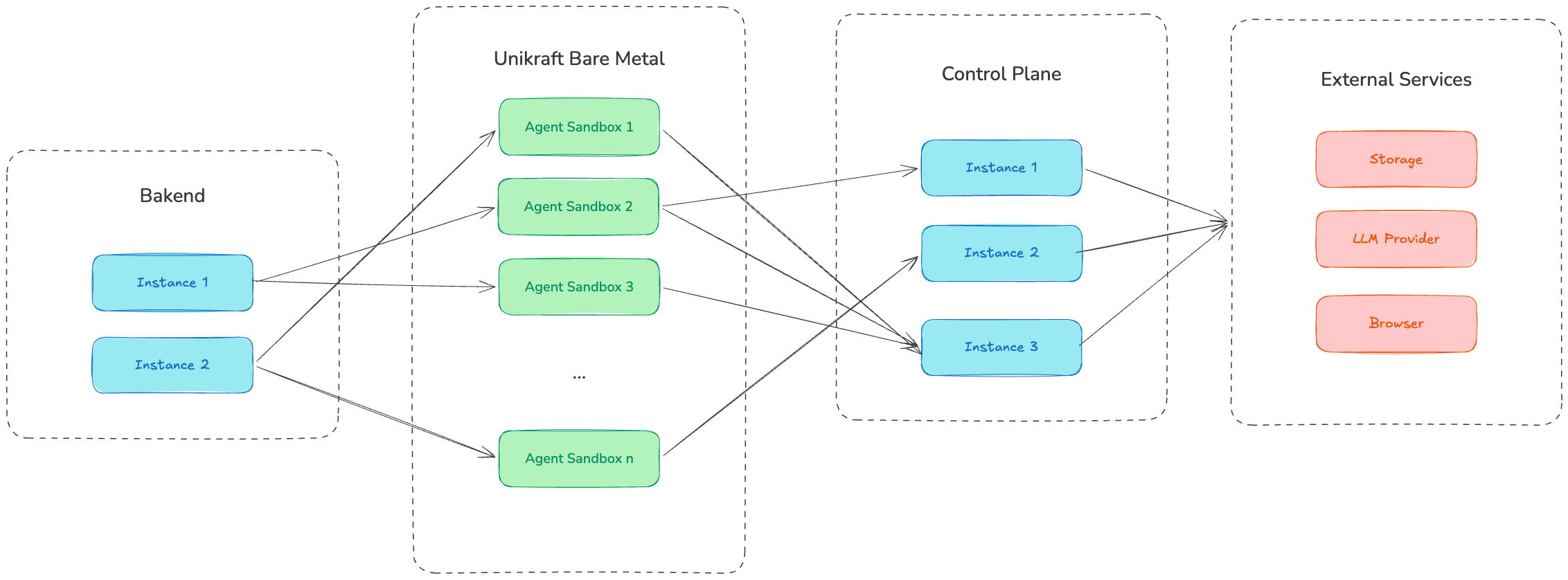
The Architecture: Isolate the Entire Agent
Browser Use’s key architectural decision was to put the entire agent — not just the code execution tool — inside a sandboxed Unikraft microVM. Each agent gets its own VM with only three environment variables: a session token, a control plane URL, and a session ID. No AWS keys. No database credentials. No API tokens.
The agent communicates with the outside world exclusively through a control plane that holds all credentials and acts as a proxy. Need to call an LLM? Goes through the control plane. Upload a file to S3? Through the control plane. The sandbox has no direct access to anything else.
The result: The agent has nothing worth stealing and nothing worth preserving. You can kill it, restart it, or scale it independently. The control plane holds the truth.
For the full technical deep-dive on this architecture (including their hardening approach, the gateway protocol, and how file sync works) Browser Use published an amazing and detailed engineering post that’s well worth the detour.
“We need real sandboxing for every session — full network access, no state leaking between agents. Unikraft gives us hardware-level isolation out of the box, so we can run untrusted AI-generated code without compromise.” — Gregor Zunic, Co-Founder & CTO
Same Image Everywhere
A clever design choice worth highlighting: The same container image runs in both production and development. In production, it runs as a Unikraft microVM. In local development and evals, it runs as a Docker container. A single config switch controls which path the provisioning code takes — meaning Browser Use can run the exact same agent on a dev laptop, spin up hundreds in parallel for evals, and deploy to Unikraft for production with zero changes.
Scale-to-Zero
Unikraft’s scale-to-zero works out of the box for agent sandboxes. When a sandbox is idle, the VM suspends. When the next request comes in, it resumes instantly. A sandbox sitting between queries costs almost nothing but wakes up immediately for follow-up tasks — which is critical for conversational agent sessions where there can be minutes of idle time between interactions.
Summary
| Before Unikraft | With Unikraft | |
|---|---|---|
| Cost model | Per-invocation (expensive at scale) or provider markup | Bare-metal economics, ~$0.30/hr per browser |
| Infrastructure | Vercel Functions, Kubernetes, third-party providers | Bare metal + Unikraft microVMs |
| Isolation | Container-level (shared kernel) or none | Hardware-level VM per session |
| Sandbox model | Isolate the tool only | Isolate the entire agent — zero secrets in the VM |
| Browser support | Not possible or too expensive | Hundreds of concurrent Chrome instances |
| Dev/prod parity | Different environments | Same container image everywhere |
| Scale-to-zero | Not available | Out of the box for agent sandboxes |
Browser Use is the leading open-source AI browser automation platform. Learn more at browser-use.com.
Unikraft Cloud provides millisecond cold starts, transparent scale-to-zero, and hardware-level VM isolation for every workload. Get started or book a call with our CEO Felipe — he is an engineer too, no fluffy sales talk in this conversation.