
At Unikraft, we’re on a quest for exponentially better cloud efficiency; the aim is to run workloads in as few boxes as possible — racks of servers rather than data-centers.
One important way to achieve that is to scale any idle workload (VM) down to zero, and to wake it up just in time, when the next request to it appears. The trick here is to ensure that the entire process from first receiving the request, to waking up the VM, to unbuffering the request, and to the VM actually responding, happens in millisecond timescales, so that the user sending the request never knows that the VM was actually scaled to zero (in a standby state in our lingo). In such a standby state the VM consumes no CPU nor memory resources, resources that can then go to other VMs on the server that do have actual work to do; this resume process, which takes the VM from a standby state to a running one, happens in < 10 milliseconds and looks something like this:
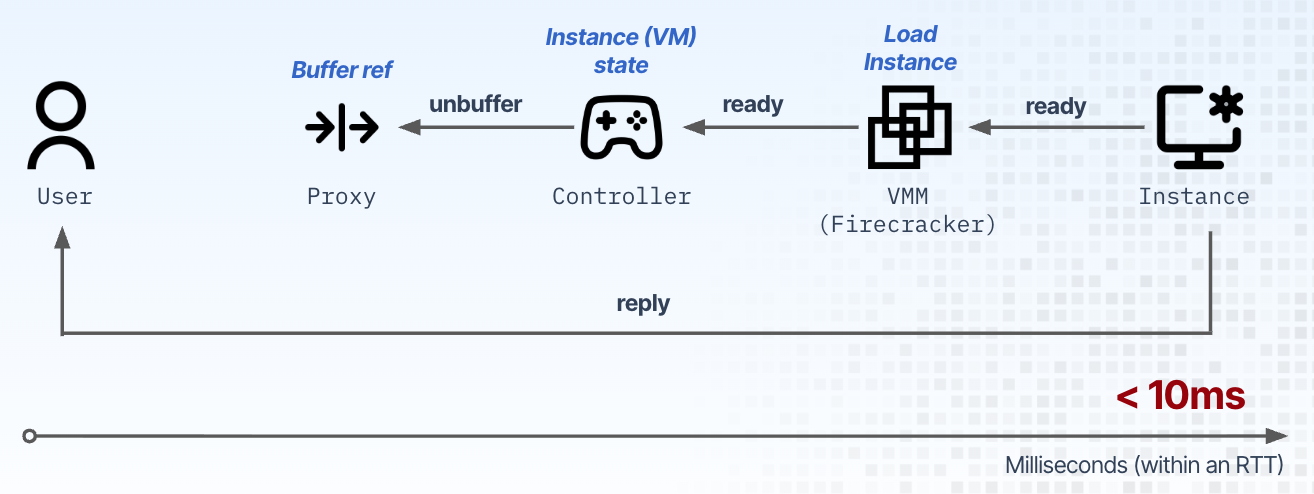
I won’t go into a lot of detail in this write-up as to how the platform achieves those < 10ms semantics, but suffice it to say that we have a custom, high-scale and fast controller and proxy, a pretty large fork of Firecracker and large snapshot and memory-based communication subsystems. Given millisecond scale to zero semantics, the name of the game was how to increase the VM density, that is, how many such scaled to zero VMs could we put in a single, standard off the shelf server without degrading the start-up time for new VMs or resume one for existing ones.
A Trip Down (Virtualization) Memory Lane
In a previous life we were virtualization and performance researchers and had already looked into achieving high density, which, back then, translated to us hacking away at most of the major components of the Xen hypervisor. The result was a paper we published in SOSP, the top systems conference in the world:
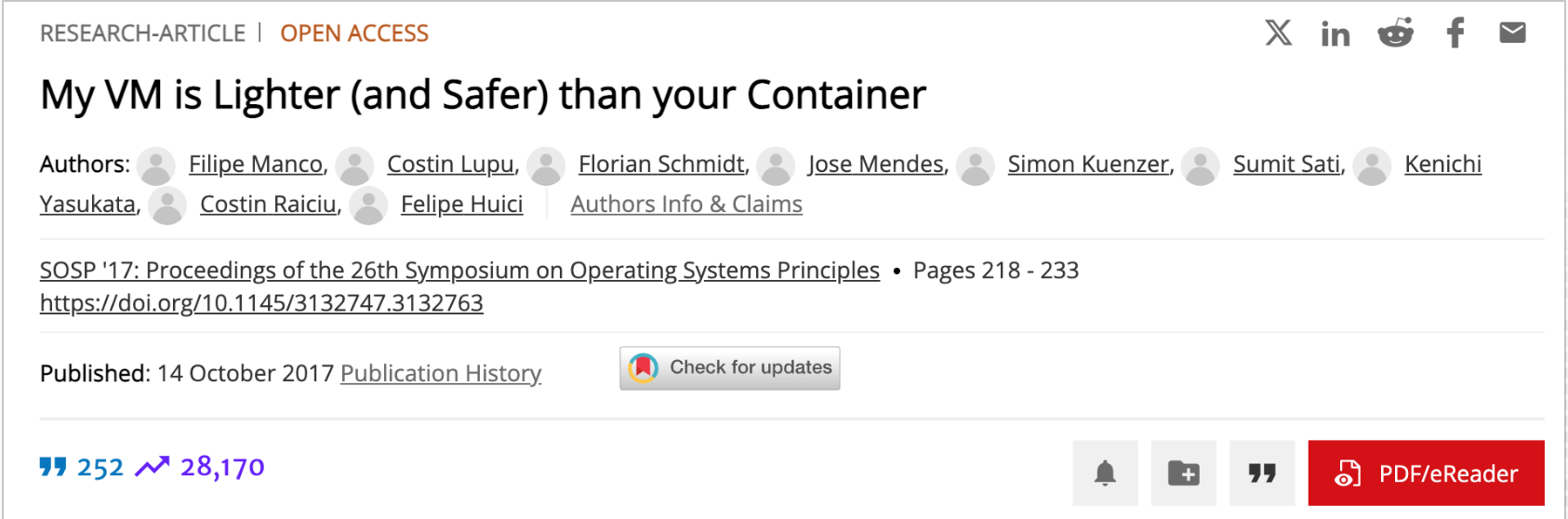
And yes, we were slightly annoyed with the industry claiming that containers were secure :), thus the somewhat hot take title (but I’ll leave the security aspect to another blog post). The paper did well, got 28K citations (the research equivalent of a TikTok video going viral) and also hit HN a few years later:

Back to the story, in the paper we showed that it was possible to run up to 8K VMs on a standard server while still being able to start new ones in a few milliseconds:
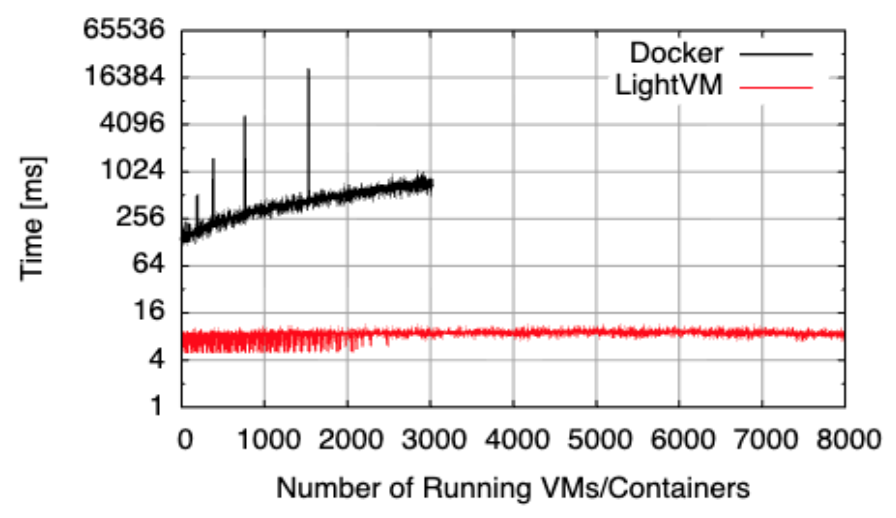
You may have noticed I mentioned the word “hack” above: the system wasn’t particularly stable, and back then we were using highly optimized NGINX images to obtain these numbers (we did experiments with other applications too, but certainly nothing like the “define anything in a Dockerfile and we’ll start in < 10ms” model we have now).
One turning point along the road was the appearance of Firecracker which, unlike other so called Virtual Machine Monitors (VMMs) like QEMU was built for speed and efficiency (and yes, I’m aware that QEMU is an emulator hijacked into being a VMM as well, but I digress). In the beginning, we had started by testing our platform at 5K-10K scales, and we were happy to see that these numbers of VMs on a single server were not affecting start or resume times. In case you’re wondering, for the benchmarking we tend to use servers with 24 or 48 CPU cores, 256-384GB of memory, and 2 x 2TB NVMe drives, so nothing spectacular. Note that the NVMe drives are important as we use them to ensure we can statefully resume VMs from snapshots quickly.
As we kept doing deployments, customers kept requesting higher and higher levels of density. Pushing that limit to 50K and beyond started making lots of things on the Linux host upset, especially on the networking side of things, where we were using one tap device per VM, leading to kernel lock contention, maxing out on the number of bridge ports and thus having to use a large and increasing number of bridges, and some funnier items like crashing Tailscale as it was scanning through all network devices on the host.
At some point it became clear that we couldn’t keep relying on tap devices and the standard network substrate on the host at the levels of scale some of our clients were requesting: 1M VMs in a server, and yeah, there were internal memes about Austin Powers floating around, like this one for example:

So basically we redesigned the platform to not use tap devices, or any of the network and protocol based sub-system, and instead move to all communications within the server to be done via shared-memory devices, including leveraging vsock. To make a long story short, we finished the bulk of this work in early 2026 and it is now in production. Before this work we had done a number of workarounds to get us to about 100K VMs, but we weren’t sure where the new architecture would take us. I mean, the platform’s core components (controller, proxy, snapshot and storage subsystems) were designed and implemented for scale and speed, but you never know — the difference between theory and practice is larger in theory than in practice.
So we asked one of our field engineers to take a box out for a spin — nothing too incredibly beefy, a standard, off-the-shelf server with 48 CPU cores, 384GB of RAM and 2 x 1.9TB NVMe drives. Because we knew we were going for (large) scale, we turned on all of the platform’s knobs, including the ability to compress all snapshots, as we wanted to run the test such that all instances could be scaled to zero and then resumed statefully; as an aside, the platform is able to restore from a compressed snapshot without having to uncompress it first, so the restore operation still happens in milliseconds.
With this in place, our engineer loaded the box with instances, in bursts of about 100 per second or so. At each step he’d randomly pick a subset of instances and check that their start and resume times were still in single to double digit milliseconds, ie, that the increase in density wasn’t overly degrading the performance of the platform. Oh, and forgot to say: each of the instances was running Bun, as we felt this was a decent choice to show a non-trivial workload. In future benchmarks we’ll look into using even chunkier applications like headful browsers.
The process continued, and it was a fun day of our engineer posting the updated total count every hour or so on our internal chat server, and all of us wondering at which point it would crash and burn :). So 100K went by, and then 200K, and then 300K… of course I have already killed this part of the intrigue with the title of this post — hard to have a catchy title and not reveal anything in it…
Many hours went by (as fast as booting an instance in 10ms or less is, it does add up :) — especially since at each step we were doing pauses to do the resume tests I’ve already mentioned and the count got to 900K, 950K, 1M! We all love round numbers right? But as the box hadn’t crashed yet, our engineer left it running overnight. Below are some of the results we got when measuring start times vs. number of VMs (labeled “instances”):
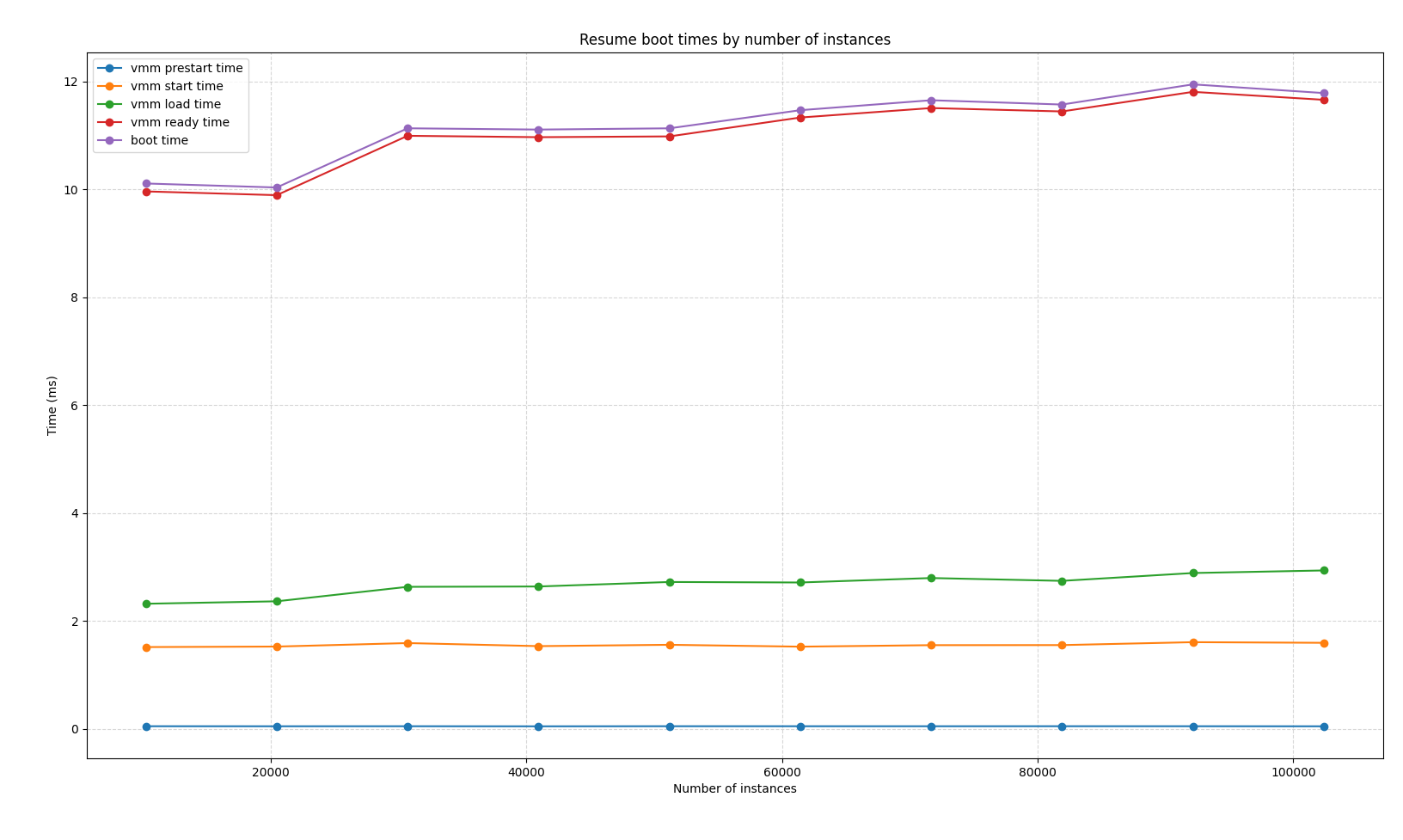
In the morning, we discovered that the count had gone all the way up to 1.4M and stopped because the box… had run out of NVMe space which we use to store the (differential, compressed, and lots of other tricks to keep this super efficient) snapshots. The platform also has mechanisms to use lower tier storage (eg, SSDs, mounted volumes, etc) but for this test we just wanted to know how many we could have while still retaining fast cold starts and restores. It would have been easy to pick a box with more NVMe drives and test again — maybe we should do so in the future.
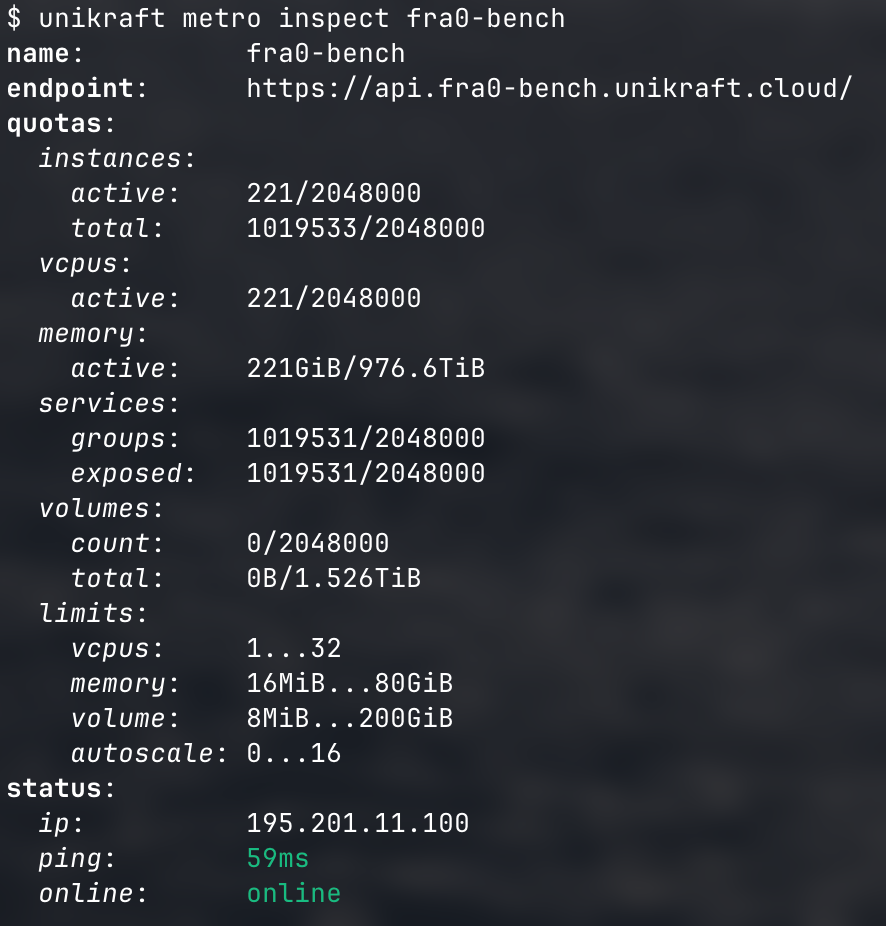
Frankly, we were so sure we were going to encounter another bottleneck when going from the roughly 100K microVMs in-a-box we had before to the 1M+ we had now — order of magnitude differences are usually not very kind to system engineering software. And in the past we had always encountered obstacles, so why wouldn’t we now. Oh, and here’s output from our Unikraft CLI showing stats from the server we used; you can see that total instances (VMs) is at 1,019,533.
This has been an interesting journey and we’re excited that this functionality is now in production. Hopefully this has been an interesting read for you, thank you for getting this far, and would love to hear your reactions and questions! Oh, and what tests do you think we should run next? :)